Why read the docs before you decide? In online roulette, most players rush straight to the live tables driven by gut emotion, chasing streaks, and testing aggressive bet-doubling systems without ever understanding how the wheel actually behaves. True mastery begins long before the first spin—it starts with disciplined preparation, clear rules, and deep system understanding.
Documentation is where the promise becomes a practical, repeatable path. When you understand the tool before you risk capital, clarity replaces fear.
When newcomers ask why read the docs before you decide, the answer lies in the fundamental philosophy of ZenRoulette: observe carefully, think independently, and trust the process. Our documentation is not a dry troubleshooting manual tucked away in a corner; it is the strategic blueprint for the entire ZenRoulette Journey.
Whether you are evaluating whether to join our mindful community or preparing your daily live session, exploring the ZenRoulette Docs transforms ambiguous promises into tangible mechanics. It reveals exactly how our side-panel assistant functions, how statistical pattern recognition operates in real-time, and how a structured 21-day routine builds psychological resilience at the wheel.
Why Read the Docs Before You Decide? The Foundation of Mindful Play
In traditional gambling culture, software is often marketed with hype—unrealistic win-rate guarantees and secret automated bots. ZenRoulette stands apart as a deliberate counter-movement. We view roulette not as a get-rich-quick gamble, but as a mental discipline arena governed by mathematics, dealer mechanics, and strict emotional control.
Reading our documentation before making a purchase or placing a bet offers three decisive advantages:
- Total Transparency: You see the exact user interface, telemetry panels, and tracking algorithms before spending a single dollar.
- Realistic Expectations: The docs demystify live casino odds and clarify that roulette outcomes are independent events requiring bankroll safety rather than blind bravado.
- Operational Fluency: You learn how to capture table numbers smoothly, read wheel frequency heatmaps, and establish stop-loss thresholds before money is on the line.
When you take the time to read the docs before you decide, you immediately eliminate buyer remorse and replace anxious guessing with calm, premeditated execution.
The 4-Step ZenRoulette Documentation Blueprint
The official ZenRoulette Docs hub is organized around a simple 4-step onboarding framework that guides every player from first installation to advanced table mastery:
1. Extension Setup & Environment Preparation
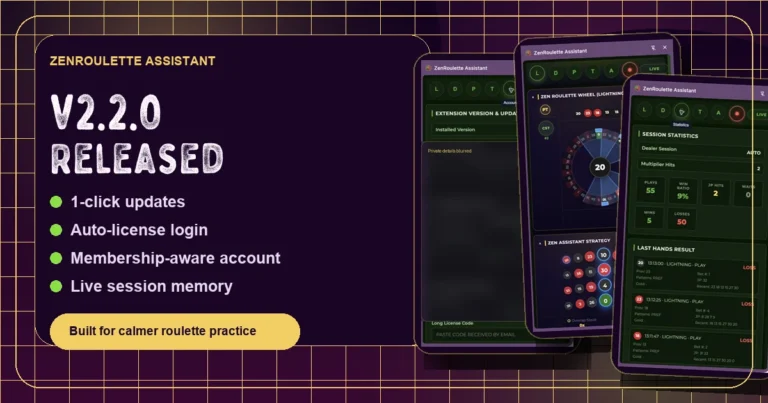
The journey starts at the Download Hub, where members obtain the ZenRoulette Assistant v2.2.0 Chrome extension. The documentation explains how to load the extension into your browser, pin it as a dedicated side-panel, and optimize your workspace layout side-by-side with your chosen live dealer platform (such as Evolution Gaming or Pragmatic Play).
2. Account Authentication & Tribe Integration
Once installed, the docs guide you to authenticate using your unified account credentials from the ZenRoulette Tribe or Shop. Connecting your assistant activates your license seamlessly, unlocks personal session recording, and connects your telemetry with our private member forum.
3. Signal Tracking & Table Observation
Before placing any bet, the documentation teaches you how to run the ZenRoulette Assistant Daily protocol. You learn how to input live spin data, monitor sector frequency (Neighbors, Voisins du Zéro, Tiers, Orphelins), and assess dealer signature consistency across different live tables. Rather than reacting impulsively to recent numbers, you observe trends calmly.
4. Deliberate Practice & The 21-Day Journey
Technical knowledge alone is not enough without emotional discipline. The docs introduce the framework of our signature 21-Day Challenge. Here, players commit to short, structured 15-minute daily sessions where the goal is perfect rule adherence and bankroll protection rather than sheer profit chasing.
How Documentation Eliminates the 3 Costliest Live-Dealer Mistakes
Online live dealer tables are engineered for rapid pace, flashing animations, and time pressure. Players who jump in without reading the manual routinely fall into three psychological traps:
1. Chasing Losses With Destructive Progressions
Untrained players frequently rely on Martingale or Fibonacci betting systems, doubling down on losses until they hit table limits or drain their bankroll. Our docs explain our non-martingale risk framework: keeping base stakes proportional to capital (typically 1–2%) and establishing hard session stop-limits.
2. Misinterpreting Random Statistical Variance
A streak of 8 consecutive red numbers often causes gamblers to bet heavily on black due to the “Gambler’s Fallacy.” The Features documentation shows you how ZenRoulette’s pattern algorithms contextualize hot and cold numbers against broader sample sizes, preventing emotionally reactive wagers.
3. Session Overstay & Cognitive Fatigue
Decision quality degrades significantly after 30 to 45 minutes of continuous wheel tracking. The ZenRoulette docs provide session timing rules, encouraging players to log session stats, lock in profits or stop-losses, and walk away with a clear head.
Comparing Onboarding Paths: Trial-and-Error vs. Docs-First Mastery
| Decision Element | Guesswork & Trial-and-Error | ZenRoulette Docs-First Path |
|---|---|---|
| Setup Time | Slow, confused, missing key settings | Under 5 minutes with step-by-step guidance |
| Bankroll Risk | High; costly mistakes during live sessions | Zero; practice mode & limit setup first |
| Tool Familiarity | Overwhelmed by UI metrics & stats | Clear understanding of every chart & signal |
| Mental State | Frustrated, reactive, anxious | Calm, focused, and disciplined |
| Next Step Direction | Unclear where to seek help or progress | Direct path to Use Cases, Training & Tribe |
Where Does ZenRoulette Fit in Your Journey?
Understanding why read the docs before you decide also clarifies which ZenRoulette resource matches your current development stage:
- Exploring the method? Start with Use Cases to see how live players apply mindful tracking to different table formats.
- Comparing strategies? Read our Alternatives Guide to contrast mindful tracking against standard betting bots.
- Ready for live assistant access? Explore the Shop and select the license tier that fits your dedication.
- Seeking personalized mentorship? Discover our Training & Private Coaching programs for direct guidance with Adrian and senior mentors.
Frequently Asked Questions (FAQ)
Why should I read the docs before purchasing or using ZenRoulette?
The documentation provides an unfiltered look at the assistant workflow, setup requirements, and core philosophy. It ensures you know exactly how the tool operates, how to configure your browser, and how to practice responsibly before committing financial resources.
Is the ZenRoulette Assistant an automated betting bot?
No. ZenRoulette is an intelligent decision-support assistant and statistical companion designed for conscious players. It analyzes live dealer outcomes, highlights mathematical patterns, and enforces mental discipline—leaving the ultimate betting decision in your hands.
How long does it take to complete the initial setup in the docs?
Following the step-by-step docs, downloading the extension, activating your login, and configuring your side-panel layout takes less than five minutes.
What is the 21-Day Challenge mentioned in the documentation?
The 21-Day Challenge is our structured experiential journey. It combines daily mindfulness exercises, pattern recognition drills, and disciplined session logging to permanently rewire impulsive gambling habits into professional methodology.
Where can I get help if I encounter an issue during setup?
Our active community is always ready to support you in the ZenRoulette Forum and the ZenRoulette Tribe. For personalized one-to-one guidance, you can also explore our dedicated Training Room.
Always remember that roulette contains inherent mathematical variance and should be approached as disciplined recreation. Play responsibly, maintain strict stop-loss boundaries, and consult resources like BeGambleAware whenever needed.
Observe carefully. Think independently. Trust the process.
— Adrian
Founder, ZenRoulette